How to Make a to Do List You Can Actually Finish
Learn how to build a to do list that stays manageable with three priorities, realistic daily capacity, and reminders that help instead of distract.
You open your Mac with a full to do list and a clear intention to make progress. By lunch, you've answered support messages, investigated a payment failure, and moved the same unfinished tasks to tomorrow. The list is longer, but it still doesn't tell you what you can realistically finish.
The fix isn't a more elaborate tagging system. It's separating everything you want to remember from the work you have room to do, then deciding which reminders deserve to interrupt you.
What Every Useful To Do List Item Contains
A list of twenty loose labels, such as marketing, website, and invoices, looks organized until you try to start. Each label leaves decisions unresolved: what result matters, where to begin, and how much time to reserve.
A label is an inventory entry, not a plan. A useful task needs enough detail that you can begin without holding another planning session.
Five fields every task needs
| Field | What it stores | Example entry |
|---|---|---|
| Desired outcome | The result that counts as done | Checkout webhook no longer drops failed payments |
| Trigger | The cue that starts the work | After the 9:00 build passes |
| Next action | The first visible step, phrased as a verb | Open the draft and write three subject lines |
| Time estimate | Expected duration in 15-minute blocks | 45 minutes, or three blocks |
| Priority tier | Whether it is a main priority or a supporting task | 1 (main priority) |
The examples show the level of specificity to use. Keep the outcome and action aligned when you build an actual entry: fixing a webhook starts with logs and a reproducible failure, while promoting that fix starts with an email draft.
For example, replace Marketing with this complete task:
Draft the launch email for the checkout fix; trigger: after the 9:00 build passes; next action: open the draft and write three subject lines; estimate: 45 minutes; priority: 1.
Make the starting cue explicit
A meta-analysis published in Advances in Experimental Social Psychology covering 94 independent studies found that implementation intentions improved goal achievement with a medium-to-large effect size, d = 0.65. These if-then plans make the cue easier to notice and the intended response easier to trigger, reducing reliance on remembering what you meant to do.
That's why a trigger matters more than an arbitrary due date. After the build passes identifies a useful moment; open the error log identifies an observable action. A reminder can then help you start rather than merely announce that something remains unfinished.
Rewrite three existing items using all five fields. Start with tasks you've already postponed, because vague wording often hides the decision that's blocking them.
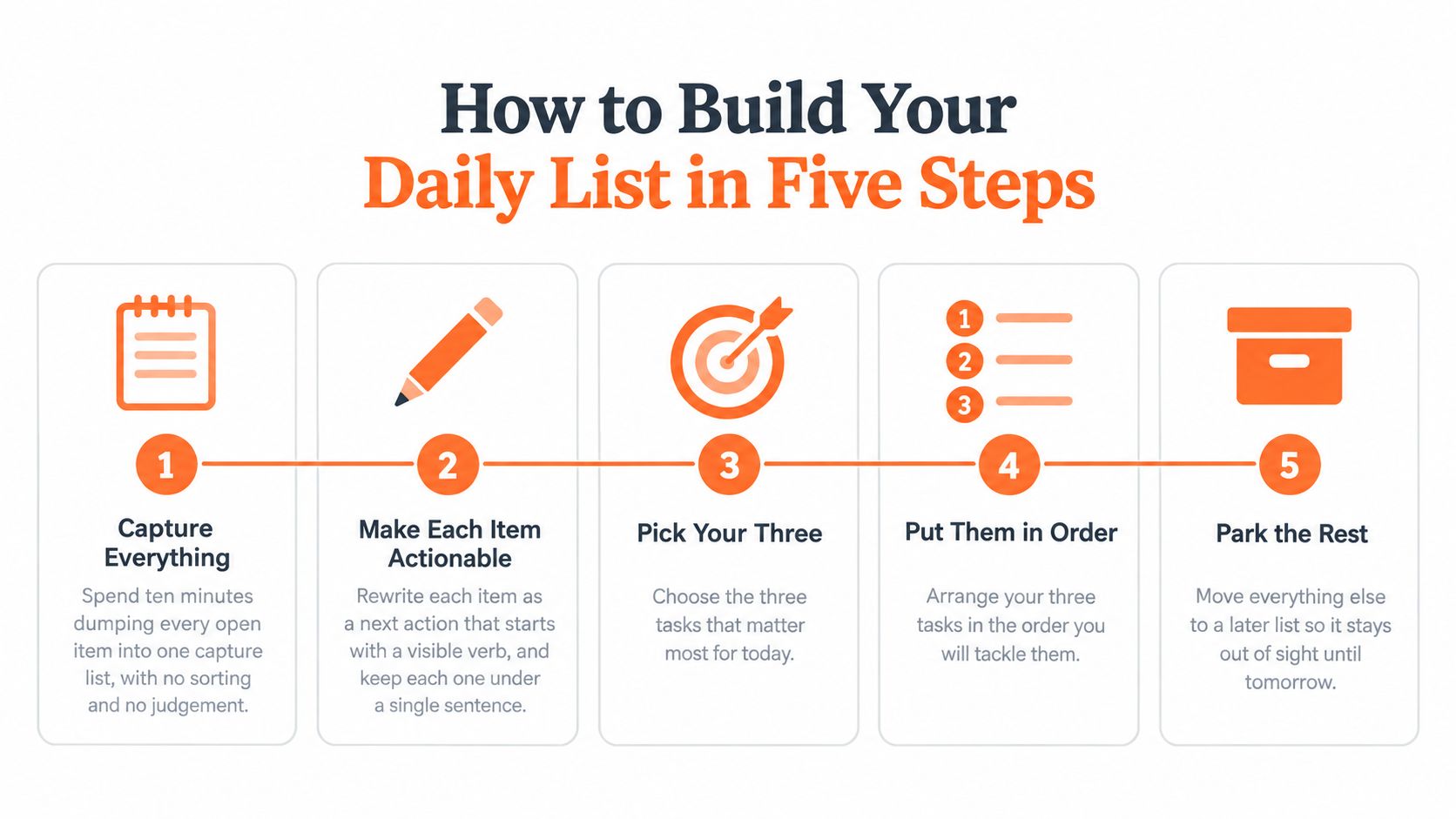
How to Build Your Daily List in Five Steps
Keep your capture list in Apple Notes, Reminders, Todoist, or whichever tool you already open reliably. Don't migrate everything before testing whether the planning method works.
Build the list before opening your inbox
Capture everything. Spend ten minutes putting every open item into one capture list, without sorting or judging it. This gives stray obligations somewhere to go without making each one a commitment for today.
Rewrite each item with a visible verb, such as reproduce, draft, send, or reconcile. Split anything you expect to take more than two hours into a finishable result, not an instruction to work on the project.
Estimate from a comparable task. Use the last similar piece of work as your baseline, then round into 15-minute blocks. Include testing, checking, and sending, not just producing the first draft.
Choose one main priority and up to two supporting tasks that fit around your existing commitments. If they don't fit, reduce the scope or remove an item instead of assuming you'll work faster.
Attach triggers and close the loop. Give each selected task a starting cue and choose an evening review time. Move everything else to a dated or undated later list.
This visual summarizes the capture, selection, ordering, and parking decisions:
A Tuesday plan for a solo developer
Say your capture list includes a checkout bug, support replies, pricing copy, analytics cleanup, and a possible redesign. Rewrite those entries into actions before deciding which belong today.
Your historical estimates suggest the checkout repair needs 90 minutes, support replies need 30 minutes, and the FAQ draft needs 45 minutes. Put those blocks against your calendar, including the meetings and maintenance work you can't remove.
The finished morning prompt would contain these three lines:
Tuesday's plan
Fix the checkout webhook | 90 minutes | After standup
Reply to three support emails | 30 minutes | After lunch
Draft the pricing FAQ | 45 minutes | After the review
Analytics cleanup stays undated unless something genuinely requires it by a particular day. The redesign belongs on the later list, not beneath today's tasks where you'll keep reconsidering it.
If you're comparing software, use these requirements when choosing a daily planner app: a small daily view, somewhere separate to park future work, and reminders you can control. A healthy daily list is three finishable lines with triggers attached, not a compressed view of your entire backlog.
Copy-Ready Daily To Do List Template
Paste this into any notes app. Replace the example actions and estimates, but keep the distinction between today's commitments and later possibilities.
Morning planning sheet
Date and day type: Tuesday, focused build day. Reserve the matching buffer before assigning work.
Minimum viable day: The three commitments below still count if new requests arrive; renegotiate them explicitly if an emergency takes their place.
Main priority: Fix the checkout webhook | Outcome: failed payments are retried | Trigger: after standup | Next action: open the webhook log and reproduce the failure | Estimate: 90 minutes (6 blocks).
Supporting task: Reply to three support emails | Trigger: after lunch | Next action: open the support inbox | Estimate: 30 minutes (2 blocks).
Supporting task: Draft the pricing FAQ | Trigger: after the review | Next action: open the FAQ doc and list five questions | Estimate: 45 minutes (3 blocks).
Later list: Undated items, reviewed only at the evening check and never counted as today.
Evening check: Mark each task done, deferred with a reason, or dropped on purpose. Record interruptions count and reschedule count.
Keep it usable: Keep the sheet under one screen. Clear the later list once a week by deleting stale ideas, scheduling real obligations, and retaining only work you still intend to do.
Why Three Priorities and a Realistic Load Beat a Long List
A daily list should work like a carry-on bag: it holds what you can realistically lift and take through the airport. A warehouse shelf holds everything, but you can't carry its contents with you.
Your backlog is the warehouse. Don't mistake its size for today's workload.
In a 2025 Atlassian survey of 6,000 knowledge workers across the United States, United Kingdom, Australia, India, Germany, and France, 82% used a formal system for organizing tasks, yet two-thirds still ended the day with unresolved items. Capturing work clearly doesn't guarantee that it fits.
Estimate the whole job
The planning fallacy shows up when you estimate the smooth version of a task. You allow for writing code but omit debugging, waiting for access, answering a customer, and recovering your place afterward.
Use your last ten similar tasks as a calibration exercise. Compare estimated and actual duration, calculate the average overrun, and add that gap to future estimates for comparable work. Don't average a quick copy edit with a payment integration; the comparison needs to be useful.
The daily planning guidance from Viemina recommends one to three important tasks, scheduled priority work, and buffer time. That makes a main priority plus supporting tasks a defensible starting point, not a scientific rule about everyone's ideal workload.
Daily load by day type
These are suggested planning settings, not measured productivity benchmarks. Tune them against your own actual durations and incoming work.
| Day type | Priority slots | Buffer time | Non-urgent interruptions |
|---|---|---|---|
| Focused build day | 1 deep task + 2 light tasks | 30% of the day | 1 batched check |
| Client or support day | 1 deep task + 1 light task | Reserve the recent average time spent on incoming requests | 2 check windows |
| Admin or sales day | Up to 3 bounded admin or sales tasks | 35% of the day | 1 batched review |
| Launch or deadline week | 1 deep task only | 50% of the day | 0 outside the deadline |
Subtract meetings and fixed commitments before using these settings. Buffer isn't spare capacity to fill during morning planning; it's room for work you can't predict accurately.
Your minimum viable day is the small set of outcomes you'll protect when requests arrive. If an urgent incident replaces one, name the trade-off. Adding the incident without saying so while keeping every original commitment produces an impossible plan, not stronger accountability.
When Reminders Should Stay Silent
A doorbell that rings for every delivery, passing cyclist, and falling leaf soon becomes something you ignore. Task notifications lose their meaning the same way.
Each alert asks you to leave the mental state of your current task. Even dismissing it requires a decision about whether it matters.
The Prialto executive productivity report cites University of California, Irvine research stating that refocusing after an interruption can take 23 minutes and 15 seconds. A separate workplace-research summary from eWorkResearch reports reactions to new messages within about 6 seconds, task-resumption times from 64 seconds to 20 minutes, and only 12% of received messages being critical.
Deliver according to consequence
Those timings describe different interruption situations, not a universal penalty to add to every notification. The practical question is whether the consequence of waiting outweighs the cost of stopping.
The chapter How Do Interruptions Affect Productivity? describes shorter interruptions and interruptions at natural task breaks as generally less disruptive. It also discusses a diary study linking more interruptions and more items to remember with weaker prospective memory, the ability to remember to carry out an intended action.
Use that distinction to set delivery rules.
| Reminder type | Deliver now? | Batch instead? | Example |
|---|---|---|---|
| Hard deadline within the next hour | Yes | No | Client demo starts in 30 minutes |
| Scheduled task at its trigger point | Yes, at a task boundary | No | Review the webhook log after the 9:00 build |
| Overdue low-value item | No | Yes, into the evening review | Old idea note from last month |
| Recurring habit prompt | Only outside quiet hours | Yes, into one daily check | Stretch break reminder |
Keep accountability without the interruption
During protected work, keep recording progress silently while postponing speech bubbles or character reactions until the protected period ends. Logging and notifying are different operations; you don't need to interrupt someone to retain a useful record.
Track more than completion:
- Interruptions per day: Count prompts that pull you away, including ones you dismiss.
- Rescheduling count: Notice tasks you repeatedly move without changing their scope.
- Avoidance after reminders: Record whether a prompt helps you begin or makes you close the app.
A reminder earns its place by helping you act at a useful moment, not by repeatedly proving that something is overdue.
Don't suppress contractual deadlines or urgent customer incidents just to protect a streak of uninterrupted work. Silence the low-consequence prompts first.
Evening Reviews and Website Limits That Keep You on Track
An evening review should close the workday, not become another project. At a time you choose, check which morning commitments finished and decide what happens to the rest.
Use the review as a deliberate stopping point rather than another opportunity to expand tomorrow's workload.

Close each task explicitly
Keep the check under five minutes. Mark each item done, deferred with a reason, or dropped on purpose, rather than carrying everything forward automatically.
For the Tuesday example, the check-in could read:
Evening check-in
Done: Checkout webhook fixed and retry behavior checked.
Deferred: Support replies, because the payment incident used the reserved support block.
Dropped: Pricing FAQ draft, because the pricing decision changed.
Deferring requires a new decision about timing or scope. Dropping means you no longer intend to do the work, not that you've failed to stay disciplined.
A consistent end-of-day routine also gives new requests a stopping point. Capture them, decide whether any genuinely affect tomorrow, and close the list.
The morning prompt should appear when you first open your Mac and ask for no more than three tasks. That makes the loop concrete: plan, work, check, adjust.
Use this video alongside your closing review:
Give distracting sites a concrete boundary
Usage statistics can tell you where time went without changing your next decision. A warning you can dismiss indefinitely has the same weakness.
A review of digital self-control interventions in the Journal of Computer Assisted Learning found that warning prompts alone sometimes failed to reduce use, while sanctions such as lockouts produced reductions. It also reported a large reduction in distraction time when an action goal was set immediately before a distracting activity.
For a trial setup, choose YouTube with a 60-minute workday allowance, a warning at 50 minutes, and a visible remaining allowance. Decide beforehand what reaching the limit means: stop browsing, defer access, or use a blocking tool if you need an enforced boundary.
Monitoring the active site and time spent doesn't require reading page contents. Keep the permission scope narrow, and distinguish a warning or character reaction from an actual lockout.
The useful boundary is one you'll honor when you're tired. If your work requires tutorial videos, define the intended action before opening the site so necessary viewing doesn't become an open-ended browsing session.
Run One Week of This Plan Before You Change It
Use the daily template for a seven-day test. Keep the tool and review time stable so you can evaluate the workload instead of repeatedly rebuilding your system.
Each evening, record three numbers: tasks finished out of three, reminders received, and tasks rescheduled. Add a short reason when an incident or external dependency changes the day.
Adjust using decision rules
- Low completion: If fewer than two of three priorities finish on most days, cut to two priorities or raise your buffer by ten percentage points for a week.
- Repeated rescheduling: If you reschedule more than once a day, treat your estimates as too low until you've compared the last ten tasks with actual time. Check for dependencies as well as duration.
- Reminder avoidance: If a category of prompts repeatedly makes you disengage, move that category into a batch rather than making the alerts louder.
Three priorities is a practical limit, not a universal rule. A day of incident response may need a single outcome; a day of bounded administrative work may support several small actions.
Papa is a free macOS app that sits in the notch, asks for your plan each morning, applies a daily time limit on YouTube, and checks what got done at night. The same method works on paper; the app automates the prompts rather than deciding what matters.
Write tomorrow's three lines before closing today.
Keep your daily plan small enough to finish with Papa, which combines morning planning, website time limits, and an evening progress check on your Mac. Try it if you want those prompts built into your workday, and use its quiet hours and reminder cap to protect the time you've set aside to execute.